tchncs
  • Communities
  • Create Post
  • Create Community
  • heart
    Support Lemmy
  • search
    Search
  • Login
  • Sign Up
ColdWater@lemmy.ca to linux4noobs@programming.dev · 1 年前

30GB+ used on freash Arch install+KDE? Why?

lemmy.ca

message-square
35
link
fedilink
33

30GB+ used on freash Arch install+KDE? Why?

lemmy.ca

ColdWater@lemmy.ca to linux4noobs@programming.dev · 1 年前
message-square
35
link
fedilink
alert-triangle
You must log in or # to comment.
  • unexposedhazard
    link
    fedilink
    arrow-up
    14
    ·
    1 年前

    Maybe you have a swap file that happens to be 16GB ?

    • ColdWater@lemmy.caOP
      link
      fedilink
      arrow-up
      5
      ·
      1 年前

      I only allowed 4G for swap, maybe arch enabled zram and it used 8GB by default and I actually don’t need to create a swap partition?

      • superkret@feddit.org
        link
        fedilink
        arrow-up
        10
        ·
        1 年前

        Arch doesn’t really do anything you don’t tell it to do during installation.
        That’s the entire point. After installing Arch, you know what your system does, cause you configured it.

  • Kalcifer@sh.itjust.works
    link
    fedilink
    arrow-up
    14
    arrow-down
    1
    ·
    edit-2
    1 年前

    You can try using # du -h -d 1 / to locate the largest directory under /. Once you’ve located the largest directory, replace / with that directory. Repeat that until you find the culprit (if there is a single large directory).

    EDIT (2024-07-22T19:34Z): As suggested by @DarkThoughts@fedia.io, you can also use a program like Filelight, which provides a visual and more comprehensive breakdown of the sizes of directories.

    • DarkThoughts@fedia.io
      link
      fedilink
      arrow-up
      15
      ·
      1 年前

      You can use Filelight which is much simpler and more visual.

      • ByteOnBikes@slrpnk.net
        link
        fedilink
        arrow-up
        13
        ·
        1 年前

        But it doesn’t make you feel like hackerman

        • SidewaysHighways@lemmy.world
          link
          fedilink
          arrow-up
          5
          ·
          1 年前

          goddamn does it ever feel good to feel like a hackerman

      • Kalcifer@sh.itjust.works
        link
        fedilink
        arrow-up
        2
        ·
        1 年前

        Agreed.

      • NostraDavid@programming.dev
        link
        fedilink
        arrow-up
        2
        ·
        1 年前

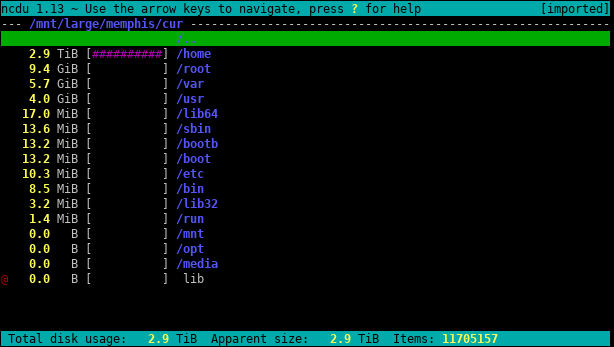
        ncdu for the terminal. Also enables you to delete folders/files.

        • Oscar@programming.dev
          link
          fedilink
          English
          arrow-up
          1
          ·
          1 年前

          gdu is another alternative. It is sometimes faster than ncdu for me.

    • FlexibleToast@lemmy.world
      link
      fedilink
      arrow-up
      2
      ·
      1 年前

      Df does that too, or did you mean du?

      • Kalcifer@sh.itjust.works
        link
        fedilink
        arrow-up
        4
        ·
        1 年前

        Whoops! You are correct — I have updated the original comment. I’m not sure why I wrote df instead of du. This is a good example of why one should always be wary of blindly copying commands 😜 It begins to teeter on being potentially disastrous if I had instead wrote dd.

        • FlexibleToast@lemmy.world
          link
          fedilink
          arrow-up
          3
          ·
          1 年前

          Luckily the syntax wouldn’t have worked if it was dd

    • ColdWater@lemmy.caOP
      link
      fedilink
      arrow-up
      2
      ·
      1 年前

      You’re a life saver I finally found the culprit

      • flambonkscious@sh.itjust.works
        link
        fedilink
        English
        arrow-up
        5
        ·
        1 年前

        Do tell! We need a follow up :)

        • ColdWater@lemmy.caOP
          link
          fedilink
          arrow-up
          4
          arrow-down
          1
          ·
          1 年前

          It’s “Steam” inside .local eat up 6GB even though I have not open it yet and tmp files (almost 5GB) that is not clear itself after installing the OS

          • 0xDREADBEEF@programming.dev
            link
            fedilink
            English
            arrow-up
            1
            ·
            1 年前

            A fresh Arch install included Steam? Or was this not a fresh install?

            • ColdWater@lemmy.caOP
              link
              fedilink
              arrow-up
              3
              ·
              1 年前

              I install it during pacstrap

              • 0xDREADBEEF@programming.dev
                link
                fedilink
                English
                arrow-up
                2
                ·
                1 年前

                Ah, I see. Just be aware that any additional file size when you get to the stage you can install KDE is pretty much considered the “bloat” part of installs, meaning you only make arch as bloated as you want after that. I like filelight in KDE https://apps.kde.org/filelight/

    • Artyom@lemm.ee
      link
      fedilink
      arrow-up
      1
      ·
      1 年前

      Or you could use baobab to do the same thing if you want an answer within 10 minutes.

      • sunstoned@lemmus.org
        link
        fedilink
        English
        arrow-up
        2
        ·
        1 年前

        Or dust if you want it fastest with a pretty graph

  • Potatisen@lemmy.world
    link
    fedilink
    arrow-up
    9
    ·
    1 年前

    It might have something to do with the dolphin you’re keeping in there.

    • ColdWater@lemmy.caOP
      link
      fedilink
      arrow-up
      4
      arrow-down
      1
      ·
      1 年前

      ?

      • Midnight Wolf@lemmy.world
        link
        fedilink
        English
        arrow-up
        10
        ·
        1 年前

        Dolphins are quite large

        • radivojevic@discuss.online
          link
          fedilink
          arrow-up
          5
          ·
          1 年前

          But they’re faster than lightning.

  • Kalcifer@sh.itjust.works
    link
    fedilink
    arrow-up
    6
    ·
    edit-2
    1 年前

    Try the following command to list all installed packages sorted by size [source]:

    LC_ALL=C.UTF-8 pacman -Qi | awk '/^Name/{name=$3} /^Installed Size/{print $4$5, name}' | LC_ALL=C.UTF-8 sort -h

    There may be some unexpectedly large packages installed.

  • remram@lemmy.ml
    link
    fedilink
    English
    arrow-up
    5
    ·
    1 年前

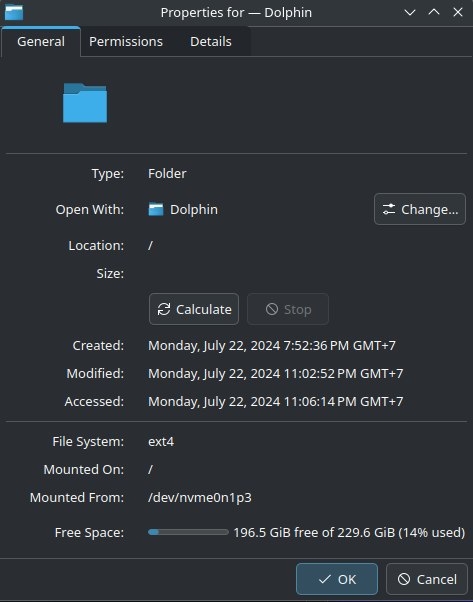
    Keep in mind that a part of the filesystem will be reserved on creation. Here if I create a completely empty ext4 filesystem with:

    truncate -s 230G /tmp/img
    mkfs.ext4 /tmp/img
    mount /tmp/img /mnt
    

    Dolphin reports “213.8 GiB free of 225.3 GiB (5% used)”

    screenshot

  • adam_y@lemmy.world
    link
    fedilink
    English
    arrow-up
    5
    ·
    1 年前

    Freash on a leak

  • Fijxu@programming.dev
    link
    fedilink
    arrow-up
    4
    ·
    1 年前
    ncdu /
    
  • 𝘋𝘪𝘳𝘬@lemmy.ml
    link
    fedilink
    arrow-up
    4
    ·
    1 年前

    Try running pacman -Scc to get rid of the pacman cache.

    Also: How did you install KDE?

    • ColdWater@lemmy.caOP
      link
      fedilink
      arrow-up
      4
      ·
      1 年前

      I used “sudo pacman -S plasma sddm”

  • EddyBot
    link
    fedilink
    arrow-up
    3
    ·
    1 年前

    sounds ok for me if you install the full KDE Plasma + all applications package group and add some basic software like LibreOffice

    • ColdWater@lemmy.caOP
      link
      fedilink
      arrow-up
      3
      ·
      1 年前

      I used minimal plasma (pacman -S plasma)

      • sanpo@sopuli.xyz
        link
        fedilink
        arrow-up
        11
        ·
        1 年前

        plasma-desktop is the minimal one.

      • LinearArray@programming.dev
        link
        fedilink
        English
        arrow-up
        1
        ·
        1 年前

        use plasma-desktop, that’s the actual minimal one.

linux4noobs@programming.dev

linux4noobs@programming.dev

Subscribe from Remote Instance

Create a post
You are not logged in. However you can subscribe from another Fediverse account, for example Lemmy or Mastodon. To do this, paste the following into the search field of your instance: !linux4noobs@programming.dev

linux4noobs


Noob Friendly, Expert Enabling

Whether you’re a seasoned pro or the noobiest of noobs, you’ve found the right place for Linux support and information. With a dedication to supporting free and open source software, this community aims to ensure Linux fits your needs and works for you. From troubleshooting to tutorials, practical tips, news and more, all aspects of Linux are warmly welcomed. Join a community of like-minded enthusiasts and professionals driving Linux’s ongoing evolution.


Seeking Support?
  • Mention your Linux distro and relevant system details.
  • Describe what you’ve tried so far.
  • Share your solution even if you found it yourself.
  • Do not delete your post. This allows other people to see possible solutions if they have a similar problem.
  • Properly format any scripts, code, logs, or error messages.
  • Be mindful to omit any sensitive information such as usernames, passwords, IP addresses, etc.

Community Rules

  • Keep discussions respectful and amiable. This community is a space where individuals may freely inquire, exchange thoughts, express viewpoints, and extend help without encountering belittlement. We were all a noob at one point. Differing opinions and ideas is a normal part of discourse, but it must remain civil. Offenders will be warned and/or removed.
  • Posts must be Linux oriented
  • Spam or affiliate links will not be tolerated.
Visibility: Public
globe

This community can be federated to other instances and be posted/commented in by their users.

  • 3 users / day
  • 109 users / week
  • 232 users / month
  • 876 users / 6 months
  • 40 local subscribers
  • 3.22K subscribers
  • 232 Posts
  • 1.9K Comments
  • Modlog
  • mods:
  • PlutoParty@programming.dev
  • BE: 0.19.13
  • Modlog
  • Legal
  • Instances
  • Docs
  • Code
  • join-lemmy.org